Backing Up Your Digital Images
Here’s a little secret about all professional photographers (and I do mean all). Every one of us is paranoid. Some of us are just more paranoid than others.
Of course what I’m talking about is the pro photographer’s need to back up his or her images in the field. Each of us has our own method of doing so, depending on one’s level of comfort and relationship with God. In any case, backing up is a good idea even if you are a newbie photographer. You certainly don’t want to risk losing your images from your 3-week European family vacation.
Here are the methods I use to back up in the field and at home.
In the Field
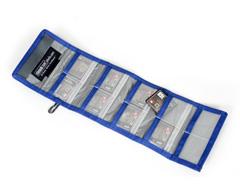
First, I carry 12-20 storage cards for my Nikon DSLR and Fuji medium format cameras, ranging from 32 GB to 128GB each. Rarely do I shoot through all the cards on an assignment, even if I’m gone for two or three weeks (and I shoot RAW only). As I use each card I put it in a nifty case called a Pixel Pocket Rocket (www.thinktankphoto.com), facing backward, so I know it has been used. From that point on, my used cards are either on my person or nestled comfortable in a hotel safe.
Each night, I back up my storage cards to Lightroom on my 15” MacBook Pro laptop and to a 2 TB portable drive, an incredibly small, lightweight, durable and inexpensive solution. Backing up to my laptop also gives me an opportunity to review my images on a large screen and to gauge how the assignment is proceeding.
Paranoid, right? Well, if you’re not convinced yet, listen to this. On the way home, I make sure to carry every backup with me onto the plane (well I sure as hell am not going to trust my livelihood to airport baggage handlers!). However I divvy them up so that if my carry-on rolling camera bag is stolen, I still have the portable drive in my pocket and I haven’t lost the entire shoot. If my wife is traveling with me, I might give the drive to carry on board in her purse. My laptop is in its carrying case. All the original storage cards are in the Pixel Pocket Rocket, safely tucked into the camera bag.
When I get home, I transfer the entire shoot from the portable drive to an 8TB desktop Pegasus R4 backup system. Once I download the images and backup my office system, then I format my storage cards and the portable drive and delete the images from the laptop. Now I’m ready for my next photo shoot.
At Home
My home office involves a 27" i-Mac system. Each night my image library is automatically backed up onto the Pegasus drive and once a week the entire system is backed up onto a third hard drive.
But, what about fire, flood or pestilence? Good question. I cover that base by keeping two, 4-TB backup drives in a safe deposit box at my local bank. On one of the first days of every month I retrieve those drives, back up the entire system and return them to the bank vault.
Colleagues of mine have variations on this theme. Several make an annual back up of all their images shot during that year and file that backup offsite. Others make permanent backups of each trip or assignment onto a growing stack of backup drives. As the saying goes, God is good, but you’d better have a backup plan.